Operator Training Module for Machine and Plant Operators
Train your operators on dismantling, assembly, maintenance and troubleshooting in 3D — offline, in their own language, on a kiosk, tablet or touchscreen, with a test at the end.
Interactive 3D Operator Training, Built From Your Own Machine
An operator training module is a touch program that teaches a machine operator how to dismantle, assemble, run, maintain and troubleshoot one specific machine — on screen, in his own language, before he ever puts a spanner on it. We build it from your CAD data, so every bolt on screen is the bolt on the shop floor.
Where Operator Training Is Needed on a Machine
We build the module topic by topic — you pick which of the six matter for your operators.
Dismantling
The order parts come off, which fasteners release first, and what must be supported before anything is loosened.
Assembling
Reassembly in sequence, with alignment references, torque values and the checks that pass before the machine is closed.
Operation
Start-up, running, changeover and shutdown — what each control does and what the machine should be doing.
Troubleshooting
Symptom to cause to action. The operator picks what he sees; the module shows where to look.
Maintenance
Lubrication points, filter and seal changes, wear-part replacement — shown as a sequence, not a checklist.
Inspection
What to look at, what good looks like, and what condition means stop the machine and report it.
Learn, Practice and Test — Three Modes in One Module
This is what separates a training module from a video: it knows whether the operator actually learned anything.
Learn Mode
A 3D animation plays one step at a time with a single instruction above it. Back, Next, or autoplay — the full sequence of operation stays visible alongside.
Practice Mode
The same sequence without prompts. He recalls the order himself and the module confirms or corrects. This is where recall actually forms.
Test Mode
Timed questions on crane capacity, bolt counts and correct sequence. Score, rating, and retry only the ones he failed — a defensible record for certification.
Where the Operator Training Module Runs
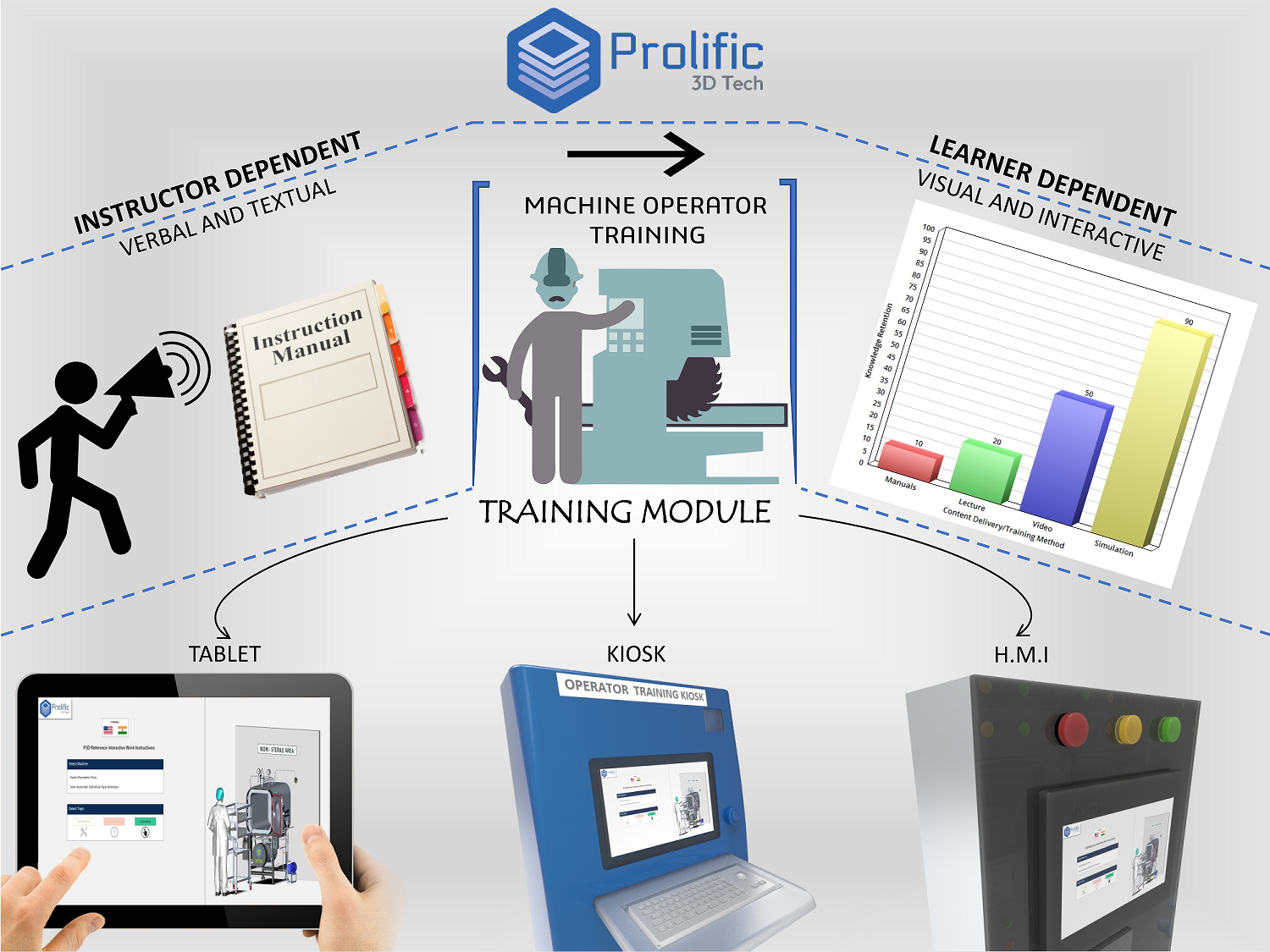
Installed on the hardware you choose. No plant Wi-Fi, no cloud account, no licence server, no IT approval.
Shop-floor kiosk
A standing touch unit beside the machine, so an operator can check a sequence mid-job instead of guessing.
Tablet
Carried to the equipment, or handed to a new joiner for the week he is being inducted.
Touchscreen TV
One person drives in the training room while a batch watches — then each takes the test individually.
Machine HMI
Embedded beside the control screen the operator already uses every shift.
For an OEM, the same build ships with the machine as a training deliverable — easier to justify to a customer than another printed manual, and it keeps your commissioning engineer off a plane.
Why 3D Instead of a Manual or a Classroom Lecture
Language stops being a barrier
One build, one toggle. English and Hindi as standard, other Indian and international languages on request — so a plant with operators from four states trains all of them from one installation.
The camera goes where a person cannot
An animation cuts a section through a housing, fades a guard away, or sits inside a gearbox while it turns. A trainer standing at the machine cannot show any of that.
Sequence is a safety control
Most dismantling accidents are sequence accidents. Showing the order and testing it before the job sits in the same family as lockout/tagout procedure — it removes the guessing.
What We Need From You
Send these and we will scope the build. A single machine with one topic and a plant with nine machines are different projects, so we quote after seeing them.
Coming Next: AI Language Conversion and AI Characters
In development, and scopable into a new build.
AI language conversion
Today a new language means re-recording voice and retyping instructions. AI conversion lets one authored module speak Marathi, Gujarati, Tamil or Bengali without a separate build.
An AI character that answers back
Instead of only stepping through a fixed sequence, an AI character demonstrates the task and answers a question asked in the operator’s own words — the same technology behind our AI-powered virtual showroom, pointed at training instead of selling.
Related 3D Services
An operator training module usually sits next to these. We are not only an animation studio — this program exists because a client had a training problem a video could not fix, so we built software instead. That is what Prolific 3D Tech does: solve problems with 3D technology.
Operator Training Module — FAQs
Does the operator training module need an internet connection?
No. The program is fully offline. It is installed on the kiosk, tablet, touchscreen TV or HMI and runs from that device with no network, no login and no cloud dependency.
Which languages does the operator training module support?
English and Hindi are standard, switched by a toggle inside the module. Other Indian and international languages are added on request, and AI-driven language conversion is in development.
Can it work if we do not have a 3D model of the machine?
Yes. We build the 3D model first, from your general arrangement drawings, or from photographs and measured dimensions if drawings are not available.
Can we use the test scores for operator certification?
Yes. Test mode records the score, the rating and the questions failed, which gives you a defensible basis for certifying and grading an operator on a particular machine.
Can an OEM ship the operator training module with the machine?
Yes, and it is one of the more common uses. The module travels with the equipment as a training deliverable, which reduces how often a commissioning engineer has to travel to explain the same procedure.
How many machines can one operator training module cover?
As many as needed. The operator selects the machine first, then the topic, so one installation can carry a whole line or a whole plant.
Train Operators Before They Touch the Machine
Send us the machine model and the work instruction. We will show you what an operator training module for it looks like.
Talk to Us